
티스토리 뷰
컴퓨터공학과 5584977 이지현
캡스톤디자인(1) TEAM 우연한 인연
Issue #39 유저는 게시글을 신고할 수 있고 신고한 게시글의 신고를 취소할 수 있다.
게시글 신고
- 유저가 게시글을 이미 신고했는지 확인
- 신고한 유저가 쓴 게시글이 아닌지 확인
- 게시글이 존재하는지, 유저가 존재하는지 확인
신고 취소
- 유저가 게시글을 신고했는지 확인 (여기서 게시글 존재, 유저 확인 다 가능)
- 유저가 게시글을 이미 신고 취소했는지 확인 (해야할까
1. controller, service 파일 생성
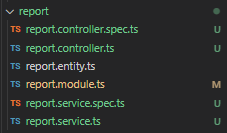
- 이번 report 폴더에는 controller와 service가 만들어져있지 않아서 터미널에서 만들어주었다.
nest g(enerate) co(ntroller) / nest g(enerate) s(ervice)


report 폴더에 컨트롤러와 서비스가 만들어졌고, module 파일에는 자동으로 import 되었다.
2. 신고 기능 추가
- controller
// 신고
@Post()
@Roles([Role.User])
async Report(@Req() req, @Body() body: RequestCreateReportDto) {
    return await this.reportService.addReport(
        body.report_type,
        req.user.user_id,
        body.post_id,
    );
}
- RequestCreateReport.dto.ts
import { ApiProperty } from "@nestjs/swagger";
import { IsNumber, IsString } from "class-validator";

export class RequestCreateReportDto {
    @ApiProperty()
    @IsNumber()
    report_type: number;

    @ApiProperty()
    @IsString()
    post_id: string;
}
@Post()로 요청을 받으면 신고 기능으로 Report() 함수를 실행한다. dto에서 받아온 report_type과 post_id의 자료형이 맞는지 확인하고, @Roles()에서 유저도 확인한 다음 서비스의 addReport() 함수를 실행한다.
- service
constructor(
    @InjectRepository(Report)
    private reportRepository: Repository<Report>,

    @InjectRepository(User)
    private userRepository: Repository<User>,

    @InjectRepository(Posting)
    private postingRepository: Repository<Posting>,
) { }
- Report, User, Posting Repository를 service의 생성자에서 선언해주었다.
/* 신고 종류 ()
0: 심한 욕설  1: 혐오 발언  2: 도배
3: 선정적인 게시물  4: 도박성 게시물  5: 광고성 게시물 */
- 신고 테이블에 number 타입인 report_type 열이 있는데, 이 타입은 임의로 0~5까지 6개로 정하고 종류를 위와 같이 정하였다.
// 본인 게시글인지 확인
checkWriter(user, post) {
    // 본인 게시글이면 false
    if (user.user_id == post.user_id.user_id) {
        return false;
    }
    else
        return true;
}
- 본인 게시글인지 확인하는 함수를 따로 만들었다. User 테이블의 user_id와 Posting 테이블의 user_id (게시글을 쓴 사람)이 같으면 본인 게시글이므로 false를 리턴한다.
(신고 취소할 때는 다른 쿼리로 확인가능해서 이 함수는 지우고 신고 service에 코드를 한 줄 추가함)
- addReport() 함수
// 신고
async addReport(report_type: number, user_id: string, post_id: string) {
    const user = await this.userRepository.findOneBy({
        user_id,
    });
    const post = await this.postingRepository.findOne({
        relations: {
            user_id: true,
        },
        where: {
            post_id,
        },
    });

    // 유저나 게시글이 존재하지 않을 때
    if (user == null) {
        throw new BadRequestException({
            status: HttpStatus.BAD_REQUEST,
            message: '유저가 존재하지 않습니다.',
        });
    }
    if (post == null) {
        throw new BadRequestException({
            status: HttpStatus.BAD_REQUEST,
            message: '게시글이 존재하지 않습니다.',
        });
    }

    // 본인 게시물 조회 미포함
    if (this.checkWriter) {
       return;
    }

	// report_type이 달라도 user, post id가 존재하면 이미 신고됨
    const isReported = await this.reportRepository
        .createQueryBuilder('report')
        .where('report.user_id = :user_id', { user_id })
        .andWhere('report.post_id = :post_id', { post_id })
        .getOne();

    // 이미 신고했으면 미포함
    if (isReported != null) return;

    // 테이블에 저장
    const rp = this.reportRepository.create({
        report_type: report_type,
        user_id: user,
        post_id: post,
    })

    return await this.reportRepository.save(rp);
}
- 유저나 게시글이 존재하지 않을 때, 본인 게시물을 신고 했을 때, 이미 신고했을 때가 아니면 신고 테이블에 신고 타입, 유저 uuid, 게시글 uuid를 저장한다.
이미 신고했는지 확인할 때는 신고 타입까지 같지 않아도 user와 post id가 존재하면 이미 신고되어 있는 것이기 때문에 신고 타입은 따로 검사하지 않음
3. 신고 취소 기능
'캡스톤디자인(1) > 개발' 카테고리의 다른 글
| 캡스톤디자인(2) 개발 - Comment MSA (0) | 2023.06.07 |
|---|---|
| 캡스톤디자인(1) 개발 - (수정) 발자국 (0) | 2022.12.06 |
| 캡스톤디자인(1) 개발 - 발자국: 발자국 조회 (0) | 2022.12.01 |
| 캡스톤디자인(1) 개발 - 발자국: 발자국 추가 (0) | 2022.12.01 |
| 캡스톤디자인(1) 개발 - 데이터 조회, 수정, 삭제 (0) | 2022.11.10 |